



Why NiFi Flows Fail and How to Fix Them with Agentic AI

Apache NiFi serves as the backbone of modern data pipelines, orchestrating, routing, and transforming data seamlessly across diverse systems. Yet, even the most robust NiFi pipelines can experience disruptions. A minor misconfiguration, overlooked property, or resource bottleneck can halt data flows, leaving operations teams scrambling to diagnose and resolve the issue.
When NiFi flows fail, the consequences extend beyond technical disruptions. They can compromise data integrity, impact business decision-making, and introduce compliance risks. For organizations managing large-scale, mission-critical data, downtime can translate into revenue loss, delayed insights, and operational inefficiencies.
In this article, we’ll explore the most common causes of NiFi flow failures, actionable strategies to prevent them, and best practices for debugging. We’ll also highlight how DFM (NiFi Ops Manager) can streamline error detection and resolution, keeping your data pipelines reliable and performant.
Common Error Patterns in NiFi Flows
Even seasoned data engineers know that NiFi flows, while incredibly powerful, can sometimes fail in unexpected ways. Understanding the typical patterns behind these failures is key to keeping your pipelines reliable and your data flowing smoothly.
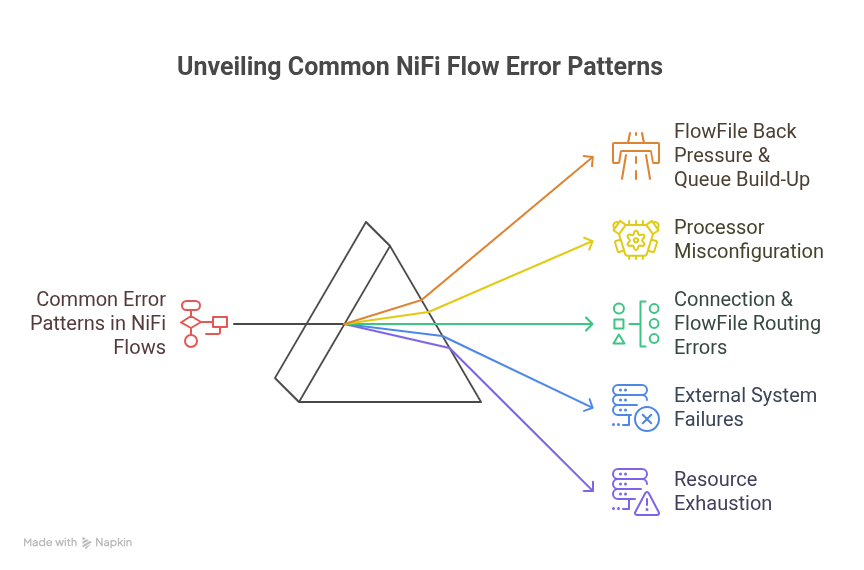
Let’s dive into the most common pitfalls and how they show up in your flows.
1. FlowFile Back Pressure & Queue Build-Up
Imagine a highway where traffic suddenly backs up for miles. That’s what happens in NiFi when queues start filling up. Processors get overwhelmed, and your flow slows to a crawl.
Signs to watch for: slow or stalled flows, delayed processing, or bottlenecked processors.
Why it happens: queues that are too small, overloaded processors, or uneven load distribution across process groups.
2. Processor Misconfiguration
NiFi processors are like the engines of your pipeline. Misconfigure them, and even the best-designed flows can sputter or stall.
Signs to watch for: failed tasks, skipped data, or outputs that don’t match expectations.
Why it happens: incorrect processor properties, wrong input/output relationships, or missing controller services.
3. Connection & FlowFile Routing Errors
Even a perfectly tuned processor can fail if FlowFiles take the wrong route. Misrouted files may get dropped or end up in unexpected processors, causing silent failures that are tricky to detect.
Signs to watch for: FlowFiles appearing in unexpected destinations, dropped files, or processors that do nothing.
Why it happens: faulty routing logic, missing relationships, or misconfigured connections.
4. External System Failures
NiFi flows often depend on external databases, APIs, or storage systems. When these systems fail, your flows feel the impact immediately.
Signs to watch for: processors failing to write data, repeated retries, or intermittent errors.
Why it happens: network interruptions, wrong credentials, system downtime, or hitting API limits.
5. Resource Exhaustion
Data pipelines can be demanding, and NiFi is no exception. Without proper tuning, high throughput or large FlowFiles can push resources to the limit.
Signs to watch for: high CPU or memory usage, slow performance, unresponsive nodes, or JVM crashes.
Why it happens: inadequate heap sizing, excessive throughput, or poorly optimized repositories.
6. Security & Permission Errors
Even the most flawless flow fails if the users running it don’t have the right permissions. Misconfigured access can halt operations in their tracks.
Signs to watch for: access denied messages, failed authentication, or inability to perform actions.
Why it happens: inconsistent RBAC policies, misconfigured users, or missing groups.
How to Fix & Prevent These Errors
Understanding why NiFi flows fail is only half the battle. Knowing how to prevent and fix these issues is where the real efficiency gains happen. Here’s how you can keep your pipelines healthy and resilient:
1. Monitor Queues & Back Pressure
Think of processor queues as traffic lanes in your data pipeline. If they fill up, the flow slows down or stalls.
- Regularly monitor queue sizes and set appropriate back pressure thresholds.
- Adjust processor concurrency to distribute the load evenly and keep your flows moving smoothly.
- Proactive monitoring is key to avoiding unexpected bottlenecks.
2. Validate Processor Configurations
Even a small misconfiguration can derail an entire flow.
- Always double-check processor properties against official documentation and best practices.
- Use parameterized templates to maintain consistency across environments, and test new configurations in a development or staging setup before deploying to production.
This minimizes surprises and reduces troubleshooting time.
3. Leverage Provenance Data
NiFi’s data provenance feature is a treasure trove for debugging.
- Use it to trace the exact path of FlowFiles, identify routing errors, and pinpoint the root cause of processor failures.
- Provenance tracking turns what could be a frustrating investigation into a clear, step-by-step analysis.
4. Handle External System Failures Gracefully
External databases, APIs, and storage systems can be unpredictable. Instead of letting temporary outages break your pipeline, implement retries, failure queues, and alerts. This way, your flows can pause, recover, and continue without data loss, ensuring reliability even when external systems are unstable.
5. Tune Resources
NiFi performance depends heavily on JVM settings, repository optimization, and cluster configurations.
- Optimize heap sizing, fine-tune repositories, and scale clusters to handle high-throughput or large FlowFiles efficiently.
- Proper resource tuning prevents crashes and keeps your data pipeline responsive under heavy loads.
6. Implement Role-Based Access Controls (RBAC)
Permission-related errors can silently stop a flow in its tracks. Implement role-based access control to ensure users and groups only have the access they need. This reduces security-related failures while keeping operations compliant and streamlined.
Traditionally, implementing RBAC required logging into each cluster individually to configure users, groups, and permissions, which is a time-consuming and error-prone process.
With Data Flow Manager, access control is centralized, enabling administrators to assign roles and permissions across multiple clusters from a single interface. This reduces configuration errors and security-related failures and streamlines governance, ensures compliance, and saves significant operational effort.
Also read: How to Configure Role-Based Access Control in Data Flow Manager?
How DFM’s Agentic AI Helps Detect and Resolve NiFi Flow Issues
Managing NiFi flows at scale can be challenging. Even with best practices in place, human oversight or subtle misconfigurations can cause errors that are difficult to detect and resolve. This is where DFM (NiFi Ops Manager), which uses Agentic AI, transforms NiFi flow management.
- Intelligent Flow Analysis: Continuously scans processors, connections, and process groups to identify misconfigurations and potential bottlenecks before they impact operations.
- Natural Language Troubleshooting: Generate detailed reports of errors, invalid components, and routing issues by simply providing a process group name or ID.
- Automated Recommendations & Self-Healing: Provides actionable fixes and can automatically resolve common configuration or routing errors, reducing manual intervention.
- Enhanced Visibility & Governance: Centralizes insights, metrics, and error patterns across clusters, making troubleshooting, auditing, and compliance easier.
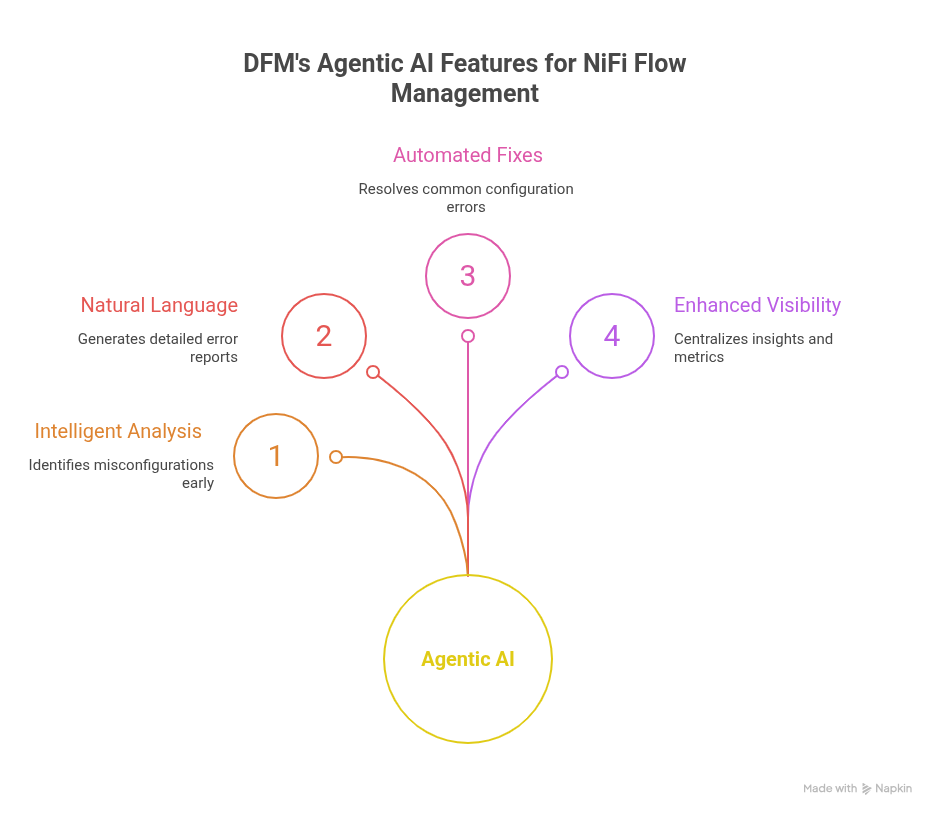
With Agentic AI, DFM (NiFi Ops Manager) transforms NiFi flow management from reactive troubleshooting to proactive, AI-assisted flow governance. It keeps pipelines stable and efficient.
Besides flow management, it also streamlines broader NiFi operations such as cluster management, flow creation, deployments, and more. It’s not a replacement for your current systems, but a powerful companion that enhances efficiency and saves 70% of operational costs, without locking you in. With its pay-as-you-go model and cancel-anytime flexibility, teams can adopt it on their own terms.
Conclusion
NiFi flow failures don’t have to be a roadblock. They are often predictable and preventable with the right approach. By following the above best practices or tips, teams can proactively safeguard data pipelines, minimize downtime, and maintain operational efficiency.
Adding AI-assisted tools like DFM (NiFi Ops Manager) takes this a step further. It delivers real-time error detection, automated remediation, and actionable insights that empower teams to focus on value creation rather than firefighting.
Streamline your NiFi pipelines with AI-driven insights! Explore Data Flow Manager. Request a Free Demo.


 1800 121 0218
  +1 (646) 203-1075
  +91 8527471031
 sales@ksolves.com