




Top 13 Common Challenges in Apache NiFi Cluster Configuration

When organizations move from a standalone NiFi deployment to a full NiFi cluster setup, the expectation is simple: higher throughput, better availability, and smoother scaling. But reality often brings surprises. A clustered environment introduces new variables, such as distributed nodes, ZooKeeper coordination, network constraints, and flow synchronization – all of which add complexity that teams may not anticipate.
This guide walks through the top real-world challenges in Apache NiFi cluster configuration, why they occur, and how teams can avoid them. Whether you’re planning your first NiFi cluster setup or improving an existing deployment, this blog will help you understand how NiFi clusters work and the challenges to watch out for.
Understanding NiFi Cluster Architecture
Before exploring the common challenges, it’s essential to build a solid understanding of NiFi cluster architecture. This is because every configuration decision ultimately ties back to how the cluster communicates, coordinates, and maintains flow consistency.
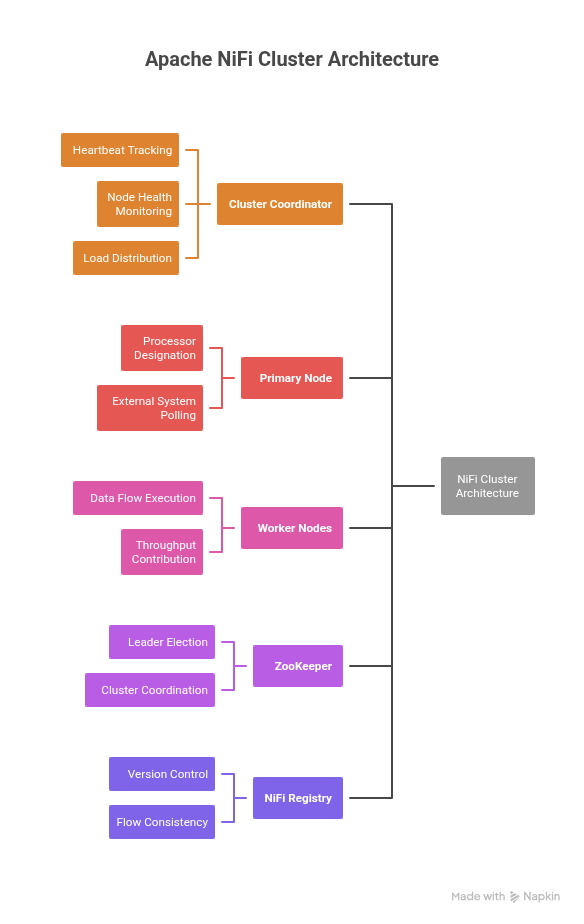
A standard Apache NiFi cluster configuration consists of the following core components:
- Cluster Coordinator
The central authority that receives heartbeats from every node, tracks node health, and orchestrates cluster-wide behaviour such as node reconnection, disconnection, and load distribution.
- Primary Node
Certain processors and tasks are designated as Primary Node Only to avoid duplication (for example, processors that poll external systems). The Primary Node handles these responsibilities while other nodes focus on parallel data processing.
- Worker Nodes (Cluster Nodes)
These are the nodes that actually run your data flows. They share the same flow configuration, execute the processors, and collectively contribute to the throughput of the NiFi cluster.
- ZooKeeper
ZooKeeper manages leader election and cluster coordination. If ZooKeeper is unstable or misconfigured, the entire cluster becomes unreliable – nodes disconnect, coordinators frequently change, and flows may pause.
- NiFi Registry
While not mandatory, it is strongly recommended for modern setups. The Registry provides centralized version control, ensures flow consistency across nodes, and prevents flow drift caused by manual edits.
Also Read: Why Choose Data Flow Manager Over NiFi Registry and Git Integration?
13 Common Challenges in NiFi Cluster Configuration
1. ZooKeeper Misconfiguration (Most Frequent in Production)
Stability of the entire cluster depends heavily on proper NiFi ZooKeeper integration. Teams often struggle with:
- Incorrect myid files in the ZK ensemble
- Mismatched quorum configuration
- Latency between ZK nodes
- Nodes attempting to connect to non-existent ZK hosts
- ZooKeeper ports not opened in firewalls
Typical symptoms:
- Nodes frequently disconnect
- Cluster Coordinator switches repeatedly
- Heartbeat failures
- Flow election conflicts
Without a stable Zookeeper for NiFi clustering, even a perfectly designed cluster collapses under load.
2. Node Heartbeat and Connection Timeouts
A well-designed NiFi cluster node management strategy must ensure nodes stay connected. Heartbeat failures usually happen due to:
- Slow GC pauses from oversized JVM heap.
- CPU throttling on cloud VMs.
- Packet drops between nodes.
- Under-tuned properties like nifi.cluster.node.connection.timeout and nifi.cluster.node.read.timeout.
Once a node misses heartbeats, it is marked as disconnected, leading to partial workflows, stuck queues, or data loss in extreme cases.
3. Flow Fingerprint Mismatch (Flow Drift)
One of the most disruptive issues during NiFi cluster node setup is flow fingerprint mismatch. This happens when:
- Teams make direct changes to individual nodes.
- NiFi Registry is not used.
- Automation accidentally overwrites flow.xml.gz.
- Manual edits to processors differ across nodes.
Result: Nodes cannot join the cluster and show “Flow is not the same across all nodes.” Avoiding this problem is essential for a smooth NiFi cluster setup and version control.
4. Incorrect Load Balancing Strategy
When configuring NiFi cluster load balancing, teams often choose the default settings, which may not fit real workloads. Common mistakes include:
- Using Round Robin for Kafka/DB flows that need partitioning.
- Overloading a single node due to skewed FlowFile attributes.
- Large queues causing backpressure on only one node.
This leads to:
- Uneven throughput
- Node performance bottlenecks
- Memory issues
- Excessive FlowFile swapping
Proper load balancing is critical for high-throughput pipelines.
5. Network Misconfiguration and Port Issues
Many cluster failures boil down to incorrect NiFi cluster ports or restricted network rules. Typical errors include:
- Wrong nifi.web.https.host or IPs.
- Missing inbound/outbound rules in cloud VPCs.
- SSL certificates with invalid SAN entries.
- Misconfigured nifi.remote.input.host.
- Using private IPs where public ones are required (or vice versa).
This breaks:
- Node-to-node communication
- Site-to-site transfers
- Heartbeats
- Secured connections
These are among the most common NiFi cluster troubleshooting scenarios.
6. Repository Performance Bottlenecks
A stable NiFi cluster setup guide must include repository planning. Storing all repositories on the same disk causes:
- High I/O contention
- Slow provenance queries
- Slow restarts
- Large checkpoint times
Issues arise especially when:
- Content repository grows uncontrollably.
- Provenance repository retention is too high.
- Backpressure forces excessive FlowFile swaps.
Bad repository design is a silent killer in clustered NiFi deployments.
7. JVM Heap Misconfiguration
Heap size determines how efficiently each node processes and stores data in memory. Real-world problems include:
- Too large a heap → long GC pauses → heartbeat loss.
- Too small a heap → OutOfMemoryError → node crash.
- Ignoring direct memory for processors like MergeRecord or ExecuteScript.
- Using the default GC instead of G1GC for large production loads.
JVM tuning is an essential part of NiFi cluster best practices.
8. Primary Node Failovers
The Primary Node handles:
- Stateful operations
- Database-heavy operations
- Certain scripts
- System-level flows
If the Primary Node switches frequently (often due to ZooKeeper instability), it causes:
- Duplicate operations
- Incomplete tasks
- State inconsistency
A stable primary node is crucial to how NiFi clusters work operationally.
9. Queue Backpressure Mismanagement
Common issues in backpressure management include:
- Backpressure thresholds too high → memory/disk exhaustion.
- Too low → flows constantly stop.
- Large queue swap files cause disk bottlenecks.
Improper handling of queues impacts:
- Node stability
- Latency
- Recovery time
Proper queue configuration is necessary in any solid NiFi cluster configuration.
10. Node Performance Variability
NiFi clustering assumes relatively homogeneous nodes. Problems arise when:
- Nodes have different CPUs or disk speeds.
- VMs autoscale but with different resource classes.
- JVM versions differ.
- Some nodes use SSDs while others use HDDs.
This leads to:
- Bottlenecks
- Processing skew
- Unpredictable data flows
Consistent hardware is central to smooth NiFi cluster node management.
11. SSL/TLS Certificate Failures
These are the most painful NiFi cluster troubleshooting incidents. Frequent issues include:
- Expired certs
- Incorrect SAN entries
- Mismatched truststores/keystores
- Wrong client auth settings
- NiFi CA tool misconfiguration
Without proper TLS configuration, node-to-node communication breaks. This also impacts the NiFi cluster security, especially when using:
- NiFi Kerberos authentication cluster
- NiFi single sign-on
- Enterprise PKI
12. NiFi Registry Misconfigurations
Even though it is not mandatory, the Registry is critical for any modern NiFi cluster and standalone deployment. A few common problems include:
- Registry unreachable from nodes
- Missing buckets
- Locked versioned flows
- Improper access control
- Poor placement inside the network
Registry mishandling is the biggest cause of flow version drift.
13. Host-Level System Limits (Open File Handlers, Memory, and JVM Constraints)
Even when the NiFi cluster setup is correct, underlying system-level configurations can break stability. Many production outages stem from host limits rather than NiFi itself.
Common host-level issues include:
- Open file handler limits (ulimit) too low.
- Insufficient virtual memory or swap.
- Improper disk I/O tuning.
- TCP port exhaustion.
- Inconsistent OS parameters across nodes.
How Data Flow Manager (DFM) Simplifies NiFi Cluster Setup and Configuration
Setting up a NiFi cluster is often far more complicated and is prone to the above risks. Even a small mistake can break the entire cluster.
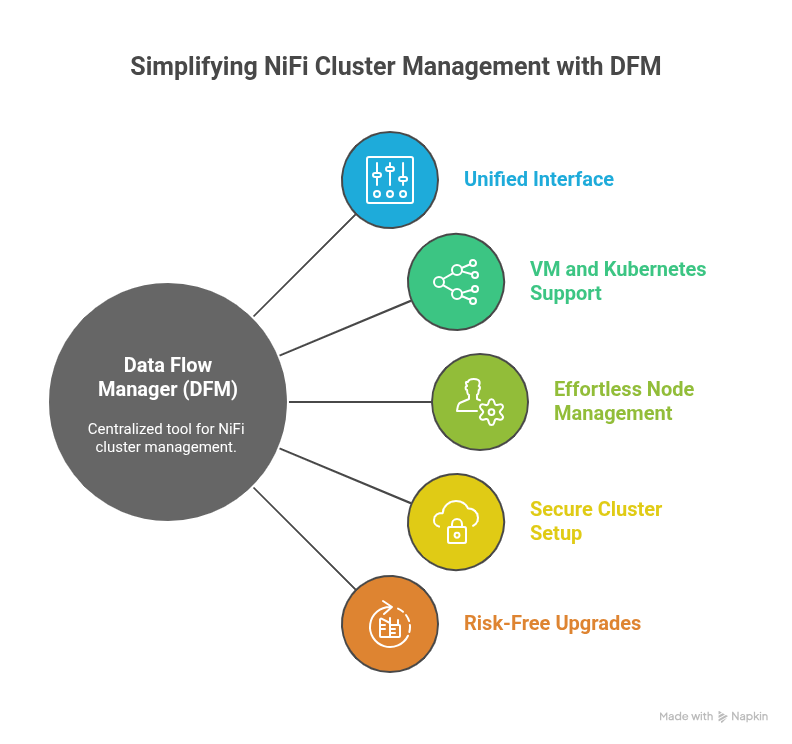
Data Flow Manager (DFM) takes this complexity out of the equation by turning NiFi cluster setup into a guided, centralized, and automated experience.
1. All Cluster Configuration, One Unified Interface
Instead of manually editing nifi.properties, authorizers.xml, bootstrap.conf, or dozens of node-level settings, DFM presents all essential cluster configuration fields in a clean, single dashboard. Administrators can configure ports, ZooKeeper parameters, repository paths, security options, and cluster topology in minutes, without navigating server directories or relying on trial-and-error.
2. Built for Both VMs and Kubernetes
Whether an organization runs NiFi on traditional virtual machines or in a containerized environment, DFM supports both seamlessly.
- On VM-based deployments, DFM handles node provisioning, certificate injection, configuration validation, and startup orchestration.
- On Kubernetes, it automates StatefulSet creation, scaling policies, service exposure, and persistent storage.
This gives teams the freedom to deploy NiFi clusters exactly where they want them, without worrying about platform differences.
3. Effortless Node Management
Managing cluster nodes, such as adding new ones, removing unhealthy ones, restarting services, or upgrading components, typically requires deep NiFi expertise.
DFM reduces this to simple, guided actions. Administrators can add or delete nodes, handle rolling upgrades, synchronize configurations, and resolve mismatches – all without disrupting data flows.
4. Secure Cluster Setup with Certificate Support
One of the hardest parts of configuring a NiFi cluster is setting up SSL/TLS correctly. DFM streamlines this by supporting secure cluster creation using uploaded certificates, such as Keystores and Truststores. It validates certificate chains, checks SAN entries, and ensures consistent security properties across all nodes. This eliminates the common causes of node-to-node communication failures.
5. Upgrades and Changes Without the Risk
Cluster updates, version changes, and configuration adjustments can break a NiFi cluster if not done carefully. DFM automates these operations with safety checks and guided workflows that prevent flow drift and ensure every node remains aligned.
6. Agentic AI for Autonomous Provisioning & Intelligent Cluster Monitoring
DFM also brings Agentic AI into the heart of NiFi operations, turning traditionally manual monitoring and troubleshooting into an autonomous, self-managing workflow:
- Continuous Health Monitoring: It keeps a real-time watch on queue depth, processor latency, JVM resources, disk usage, and node connectivity across the entire cluster.
- Proactive Issue Detection: Early signals like rising backpressure, processor slowdowns, or configuration drift are flagged instantly, long before they become production incidents.
- Guided or Automated Fixes: Depending on the severity, AI either recommends clear next steps or takes corrective action automatically, such as restarting stalled processors, clearing blocked queues, or rebalancing flowfiles.
Conclusion
Setting up and managing an Apache NiFi cluster can quickly become overwhelming – configuring nodes, handling ZooKeeper integration, securing traffic, and maintaining consistent properties across environments. Even well-run teams often struggle with cluster drift, slow troubleshooting, and the sheer effort required to maintain reliability at scale.
Data Flow Manager (DFM) changes this reality by bringing every NiFi cluster configuration and lifecycle action into one unified, intelligent interface. Whether you’re deploying on VMs or Kubernetes, managing certificates, or scaling nodes on demand, DFM eliminates the manual overhead. It ensures clusters stay stable, secure, and predictable.
Want to give it a try? Book Your Free Demo Today!


 1800 121 0218
  +1 (646) 203-1075
  +91 8527471031
 sales@ksolves.com